
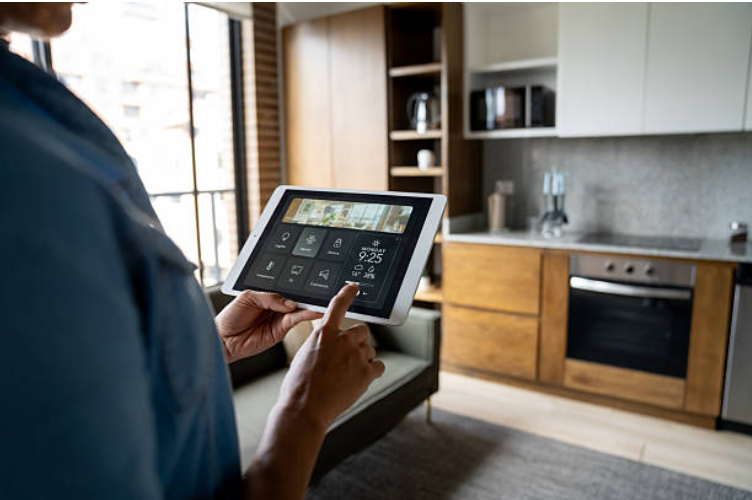
Smart home technology connects household devices to a network so they can be monitored, controlled, or automated through an app, voice assistant, schedule, or other interface. Smart lights, thermostats, cameras, doorbells, locks, speakers, plugs, and appliances can make everyday tasks more convenient, but they also introduce questions about privacy, cybersecurity, compatibility, cost, and long-term support.
The best approach is not to make every device in your home “smart.” Instead, choose products that solve a genuine problem and learn how to configure them securely. This guide explains the main benefits and drawbacks of smart home technology and what to consider before buying connected devices.
What Is Smart Home Technology?
Smart home technology refers to internet-connected or networked devices that can perform tasks automatically or be controlled remotely.
For example, a smart light can be scheduled to turn on at a particular time, while a smart thermostat can adjust heating or cooling according to a schedule. A connected doorbell may send an alert to your phone when someone approaches the door.
| Smart Device | Typical Function | Potential Benefit |
|---|---|---|
| Smart lights | Remote and scheduled lighting | Convenience and automation |
| Smart thermostat | Heating and cooling control | Greater control over temperature |
| Smart camera | Remote property monitoring | Alerts and visibility |
| Smart plug | Remote power control | Simple automation |
| Smart lock | Electronic access control | Remote or scheduled access |
Features vary considerably between products. Some devices depend heavily on a manufacturer’s cloud service, while others can perform certain functions locally. Before buying, check the product documentation rather than assuming two devices will work together.
Make Everyday Tasks More Convenient
Convenience is one of the simplest reasons to install smart-home devices.
A smart light can switch off automatically when you leave a room. A smart plug can control a compatible appliance without requiring you to reach the physical switch. A smart speaker can provide voice control for supported devices, while a connected thermostat can be adjusted remotely.
Automation can also reduce repetitive tasks. For example, you could create a routine that turns off selected lights and adjusts the thermostat at bedtime.
The important question is whether the automation actually saves you time. A device that requires frequent troubleshooting or complicated setup may provide less practical value than a simpler alternative.
Smart Home Devices Can Help Manage Energy Use
Connected technology can make energy consumption easier to monitor and manage, but a smart device does not automatically guarantee lower bills.
A smart thermostat, for example, can schedule heating and cooling around your routine. ENERGY STAR says certified smart thermostats are independently evaluated using real-world data to demonstrate energy savings. Actual results can vary according to climate, equipment, occupancy, temperature preferences, and how the thermostat is used.
Other devices can also support sensible energy habits. Smart lights can be scheduled to switch off, and some smart-home systems can coordinate devices according to occupancy or predefined schedules.
Before buying a device for energy savings, consider:
- How much energy the device itself uses.
- Which household equipment it controls.
- Whether you are likely to use its scheduling or automation features.
- Whether it is compatible with your existing heating, cooling, or electrical system.
- Whether the expected savings justify the purchase price.
Use Smart Security Devices as One Part of Home Security
Connected cameras, video doorbells, motion sensors and smart locks can provide additional information about what is happening around a property.
For example, a camera may allow you to check an area remotely, while a video doorbell can notify you when somebody approaches the entrance. Some devices also allow two-way communication through a mobile application.
However, smart security equipment should complement rather than replace basic security practices. A connected camera cannot prevent every break-in, and remote monitoring does not guarantee that an incident will be detected or stopped.
Secure the devices themselves by:
- Using a unique password for each important account.
- Enabling multi-factor authentication when available.
- Installing security and firmware updates promptly.
- Securing your home router and Wi-Fi network.
- Reviewing which accounts and apps can access the device.
- Removing old devices and accounts that you no longer use.
The FTC recommends securing both the home router and individual connected devices, including changing default credentials, using two-factor authentication where available, and keeping software updated.
Protect Your Privacy
Privacy is an important consideration because some smart devices can collect information about how you use your home.
Depending on the product, this could include information associated with voice commands, video, device activity, location, usage patterns, or account details. The exact data collected differs between products, so it is important to read the manufacturer’s privacy information before purchasing.
Pay particular attention to:
- What information the device collects.
- Whether recordings or other data are stored remotely.
- How long information is retained.
- Whether data is shared with third parties.
- Which app permissions are required.
- Whether you can delete stored information.
- What happens to your data if you stop using the product.
Think carefully before placing cameras or microphones in areas where privacy is especially important. Convenience should not automatically outweigh the sensitivity of the information a device may collect.
Check Security Support Before You Buy
A smart device is not a one-time purchase from a security perspective. Its software may need updates throughout its useful life.
The FTC recommends checking how long a manufacturer intends to provide software updates before buying a smart product. If a manufacturer does not clearly explain its update policy, that uncertainty is worth considering when comparing products.
NIST’s consumer IoT recommendations also emphasise areas such as access control and secure software-update mechanisms because vulnerabilities can emerge after a device has already been purchased.
A useful pre-purchase question is:
“How will this device be supported several years from now?”
That question can be just as important as asking what features the product has today.
Consider Compatibility Carefully
One of the frustrations of building a smart home is discovering that devices do not support the same ecosystem or features.
Matter is an industry standard designed to improve interoperability between compatible smart-home devices from different manufacturers. It can make device selection easier, but the presence of Matter does not mean that every product supports every feature or works identically with every platform.
Before purchasing, check:
- Which smart-home platform the device supports.
- Whether it supports Matter, if that matters to your setup.
- Which network technologies it requires.
- Whether the specific feature you want works with your existing devices.
- Whether a separate hub or controller is required.
- What happens if the manufacturer’s cloud service is unavailable.
Do not assume that products will work together simply because they are marketed as “smart.”
Think About the Total Cost
The purchase price is only one part of the cost of a connected-home setup.
Some products may require additional hubs, subscriptions, cloud storage, accessories, or replacement hardware. A security camera, for example, may offer basic functionality at no additional cost but charge for optional cloud recording.
When comparing products, consider:
| Cost Factor | What to Check |
|---|---|
| Initial price | Device and required accessories |
| Subscription | Cloud storage or premium features |
| Installation | Whether professional or specialist installation is needed |
| Compatibility | Whether additional equipment is required |
| Support lifespan | How long software updates are expected |
| Replacement | What happens when the device reaches end of life |
A cheaper device is not necessarily the better value if it requires expensive subscriptions or has limited long-term support.
Start With a Small, Useful Setup
You do not need to automate your entire home at once.
Start by identifying a recurring problem. If you frequently forget to switch lights off, smart lighting may be useful. If controlling heating around your schedule is the main issue, a compatible smart thermostat could be more valuable. If you want remote awareness of your front door, a connected doorbell may address that specific need.
A small setup also makes it easier to learn how each device works and to keep security settings under control.
A practical starting point is:
- Choose one problem to solve.
- Select a device that works with your existing setup.
- Check its privacy and update policies.
- Configure security settings before regular use.
- Test how it behaves when your internet connection is unavailable.
- Add another device only when there is a clear reason to do so.
Smart Home Security Checklist
Before considering your setup complete, review these basics:
- Use strong, unique account passwords.
- Enable multi-factor authentication where available.
- Secure your home Wi-Fi router.
- Install device and app updates.
- Check the manufacturer’s software-support policy.
- Review privacy settings and app permissions.
- Remove unused accounts and devices.
- Be selective about who receives access to cameras, locks, or other sensitive devices.
- Check shared access regularly.
- Keep important manual alternatives available where appropriate.
The goal is not to eliminate every possible risk. It is to make sensible choices that reduce unnecessary exposure while preserving the convenience of connected technology.
Frequently Asked Questions
What is smart home technology?
Smart home technology uses connected devices that can be monitored, controlled, or automated through apps, voice commands, schedules, or compatible home-network systems.
What are the main benefits of a smart home?
The main benefits include convenience, automation, remote control, monitoring, and potentially better management of energy use. The value depends on the devices chosen and how they are used.
Can smart home devices save money?
Some can help reduce energy use or make certain household tasks more efficient, but savings are not guaranteed. For example, ENERGY STAR-certified smart thermostats have demonstrated energy savings, while individual results depend on the home and how the device is used.
Are smart home devices secure?
Security varies by product, manufacturer, configuration, and ongoing software support. Using unique passwords, multi-factor authentication, secure Wi-Fi, and current software can reduce common risks.
What should I check before buying a smart device?
Check compatibility, privacy practices, security features, software-update support, subscription costs, required accessories, and what functions remain available if the internet or manufacturer’s cloud service is unavailable.
Is Matter the same as a smart-home platform?
No. Matter is an interoperability standard intended to help compatible smart-home products work across supported ecosystems. It does not mean every Matter-certified device has identical features or works with every platform in exactly the same way.
Conclusion
Smart home technology can make everyday life more convenient by automating routine tasks, providing remote control, and helping households monitor certain systems. It can also introduce additional costs, privacy considerations, compatibility challenges, and cybersecurity responsibilities.
The best smart home is not necessarily the one with the most connected devices. Start with a genuine household need, check compatibility and ongoing support, and secure each device before relying on it. Strong account security, regular updates, careful privacy settings, and thoughtful purchasing decisions can help you gain the benefits of connected technology without creating unnecessary complexity.